Kodi
Advertisement
Apps Overview
Kodi APK delivers a powerful, customizable media center that lets you organize, stream, and enjoy digital content with a smooth interface across multiple platforms.
Table of Contents
Kodi APK: A Complete Guide to the All-in-One Media Center for Modern Home Entertainment
Kodi APK stands as one of the most versatile and powerful media center solutions available today, widely appreciated for its open-source nature, extensive customization options, and seamless compatibility across platforms. Designed to serve as the heart of your home entertainment system, it transforms your device into an immersive multimedia hub capable of handling movies, music, photos, live TV, and more. With its award-winning features and intuitive 10-foot interface, Kodi offers a living-room-ready navigation experience ideal for smart TVs, Android TV boxes, and HTPC setups.
As the digital entertainment landscape continues to evolve, users increasingly seek solutions that unify scattered media sources into a single, streamlined ecosystem. Kodi excels in this area, offering native support for local storage, network servers, optical disks, and online content via approved third-party add-ons. Despite its depth of features, Kodi remains simple enough for casual users while still meeting the advanced needs of tech enthusiasts.
What Is Kodi APK?
Kodi APK refers to the Android package file of Kodi, allowing users to install the media center software on Android devices such as smartphones, tablets, Android TV, and streaming boxes. Originally known as XBMC (Xbox Media Center), Kodi has evolved far beyond its initial roots to support nearly every major operating system, including Windows, macOS, Linux, iOS, and Android.
The APK version brings the powerful desktop experience onto mobile and smart-TV platforms while maintaining the same polished interface, customization flexibility, and wide-ranging format support. It is especially popular among users who want a centralized media management system without the limitations found in many stock media apps.
Key Features That Make Kodi APK Stand Out
Kodi’s popularity stems from its broad set of features designed to provide users with complete control over their entertainment experience. Some of the core features include:
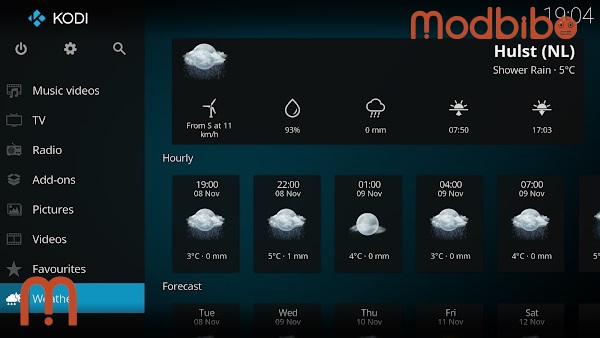
- Intuitive 10-Foot User Interface: Kodi is built with a 10-foot interface, optimized for viewing and navigating from a distance—typically using a TV and remote control. This interface focuses on readability, smooth transitions, and large, easily selectable elements, making it ideal for home theater setups.
- High Compatibility with Media Formats: Kodi supports an impressive range of audio, video, and image formats. From standard MP4, MKV, and MP3 files to more advanced and less common formats, Kodi’s built-in players are equipped to handle them all without requiring additional codecs.
- Flexible Library Management: Once installed, users can create rich, visually appealing libraries. Kodi automatically fetches metadata such as posters, descriptions, episode guides, artist details, and album covers—transforming simple folders of media files into a polished entertainment catalog.
- Customizable Skins and Themes: Personalization is one of Kodi’s strengths. Users can change the look and feel of their media center using downloadable skins, each offering a distinct design and navigation style. Notably, its standard skin, Estuary, provides a clean and modern interface, while Estouchy enhances functionality for devices with screens 5 inches or larger.
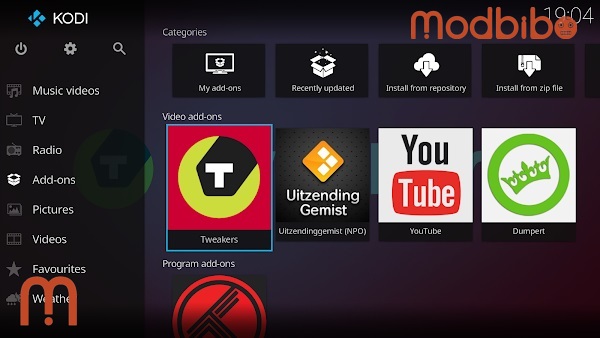
- Add-On Support for Expanded Capabilities: Beyond its native features, Kodi allows users to install a wide variety of official third-party add-ons. These add-ons unlock additional functionalities such as weather updates, visualizers, subtitle tools, and access to legally available online streams. Because Kodi does not include media content by default, this add-on ecosystem plays a key role in shaping the user experience.
- Cross-Platform Integration: Kodi APK bridges Android devices with the broader Kodi environment. Users who already use Kodi on their PC can sync libraries across devices by using network-based setups, ensuring consistent access to collections regardless of which platform they use.
Advertisement
How Kodi Enhances Home Entertainment Systems
Kodi is more than a simple media app—it is a complete entertainment hub. Its ability to unify content from local storage, network servers, and online sources makes it an ideal addition to any modern home.
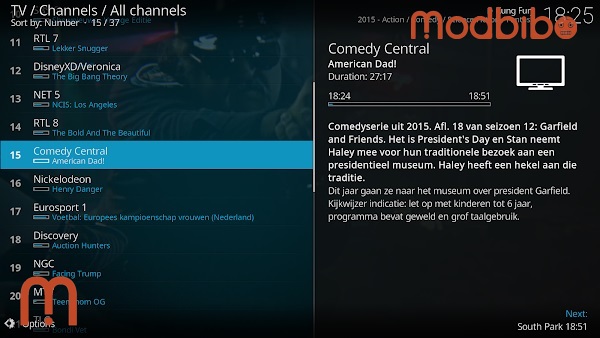
- A Centralized Media Experience: Instead of opening separate apps for movies, music, photos, and TV shows, Kodi consolidates everything under one interface. Users can easily switch between categories without losing track of their content.
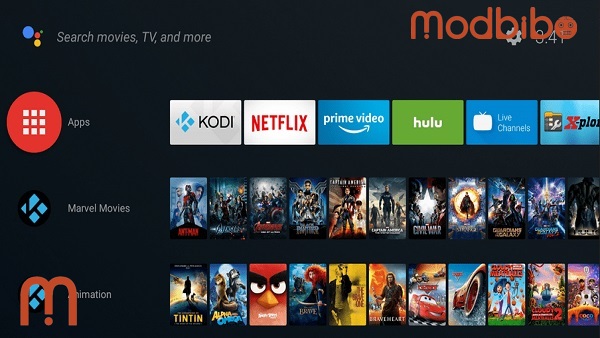
- Perfect for HTPC and Smart TV Setups: HTPC (Home Theater PC) users benefit from Kodi’s focus on remote-based control. On Android devices, especially TV boxes and smart TVs, this translates into smooth navigation using infrared remotes, Bluetooth controllers, or air mouse devices.
- Enhanced Accessibility Through Network Sources: Kodi integrates well with SMB, NFS, UPnP, and FTP sources, making it easy to stream files stored on NAS devices, desktop computers, or cloud-supported servers. For families with multiple devices, this creates a unified content ecosystem.
- Advanced Playback Options: Kodi includes powerful playback features such as subtitles, audio channel switching, playback speed controls, and playlist creation. For video purists, Kodi also supports hardware acceleration to improve performance and reduce CPU load.
Kodi APK for Mobile: Limitations and Strengths
Although Kodi APK runs on a wide range of Android devices, the experience varies depending on screen size and system capabilities.
- Designed for Larger Screens: While Kodi can technically run on smaller phones, the interface is not optimized for displays under 5 inches. The Estouchy skin improves usability on larger touchscreen devices, making Kodi more enjoyable on tablets and larger smartphones.
- Touchscreen-Friendly Navigation: Mobile users benefit from touch gestures, on-screen menus, and easy file browsing. This makes Kodi APK suitable for those who prefer portable multimedia management rather than a full home theater solution.
- Performance Based on Device Capability: Powerful devices handle Kodi’s graphical interface and media decoding more smoothly. Lower-end Android devices may experience reduced performance when handling large libraries or high-resolution media.
Customization and Personalization Options
One of Kodi’s biggest advantages is the ability to tailor nearly every aspect of the interface and experience.
Skins That Change the Look Entirely
Kodi’s skin database includes minimalistic, futuristic, colorful, and TV-style designs. Users can completely overhaul the default look without altering core functionality.
Add-Ons for Additional Tools and Enhancements
Official add-ons can provide:
-
Subtitle search services
-
Weather forecasting
-
Visualizations for music playback
-
Enhanced library management features
-
Legal streaming service integrations
These add-ons contribute to Kodi’s wide appeal across different user types.
Advanced Settings for Power Users
Users with more technical knowledge can adjust:
-
Caching behavior
-
Video rendering options
-
Audio output formats
-
Network settings
-
Library scraping rules
Advertisement
This level of control allows Kodi to scale from simple media browsing to complete home theater management.
Legal and Ethical Use of Kodi
Kodi is a legitimate, open-source platform. However, it’s important to understand its stance on media content:
-
Kodi does not include pre-installed content.
-
Users must provide their own media from legal sources.
-
Third-party add-ons offering unauthorized content are not supported or endorsed by the Kodi development team.
This ensures that Kodi remains a respected software solution within the technology community, focusing on responsible usage and open development.
Benefits of Using Kodi APK Across Devices
Kodi APK is ideal for users who want flexibility and cross-platform convenience. Some of its key benefits include:
- Unified Entertainment: Manage movies, shows, music, and photos from a single hub.
- Cost-Effective and Open-Source: Kodi is free, community-driven, and continuously updated.
- Works With a Wide Array of Devices: From Android TVs to tablets, Kodi adapts smoothly to different hardware.
- Enhanced Visual Experience: Artwork, metadata, and polished layouts contribute to a premium feel.
- Community Support and Add-On Ecosystem: Thousands of contributors help expand Kodi’s capabilities, offering solutions for nearly any need.
Who Should Use Kodi APK?
Kodi APK is an excellent fit for:
-
Users who need a customizable media center
-
Android TV owners seeking a stronger media library system
-
HTPC enthusiasts wanting a polished interface
-
Households with large digital media collections
-
Users wanting a unified platform for local and network-based content
Kodi is especially popular among individuals who prefer to maintain full control over their media libraries rather than relying on restrictive streaming apps.
Tips for Getting the Most Out of Kodi
To maximize the capabilities of Kodi APK, consider the following practices:
- Use Organized Folder Structures: File organization helps Kodi scrape accurate metadata.
- Choose the Right Skin for Your Device: Estuary is ideal for TVs, while Estouchy works best on larger mobile screens.
- Explore Official Add-Ons: Legal, reputable add-ons enhance usability and deliver new features without risk.
- Enable Hardware Acceleration: This ensures smoother playback on supported devices.
- Set Up Shared Libraries: If you use multiple Kodi devices, a shared database creates a seamless multi-device environment.
Conclusion
Kodi APK is an exceptional media center solution, combining powerful customization options, elegant design, and broad compatibility to create a truly comprehensive entertainment ecosystem. From integrating local media libraries to improving smart TV functionality, Kodi provides users with a flexible, polished, and feature-rich experience. Whether you are building a full home theater system or simply want a more capable media app for your Android device, Kodi delivers a highly adaptable platform that continues to evolve alongside modern digital needs.